
Connect Flashpricer to ChatGPT, Claude, Gemini and more
The easiest way to answer questions about your repricing data
→ Connects to your favorite AI tools in two minutes
→ Provides answers about your catalog in plain English
→ Finds items that need attention and suggests fixes
→ Pushes bulk changes to listings if you allow it
→ Consolidates multi-channel data in one place
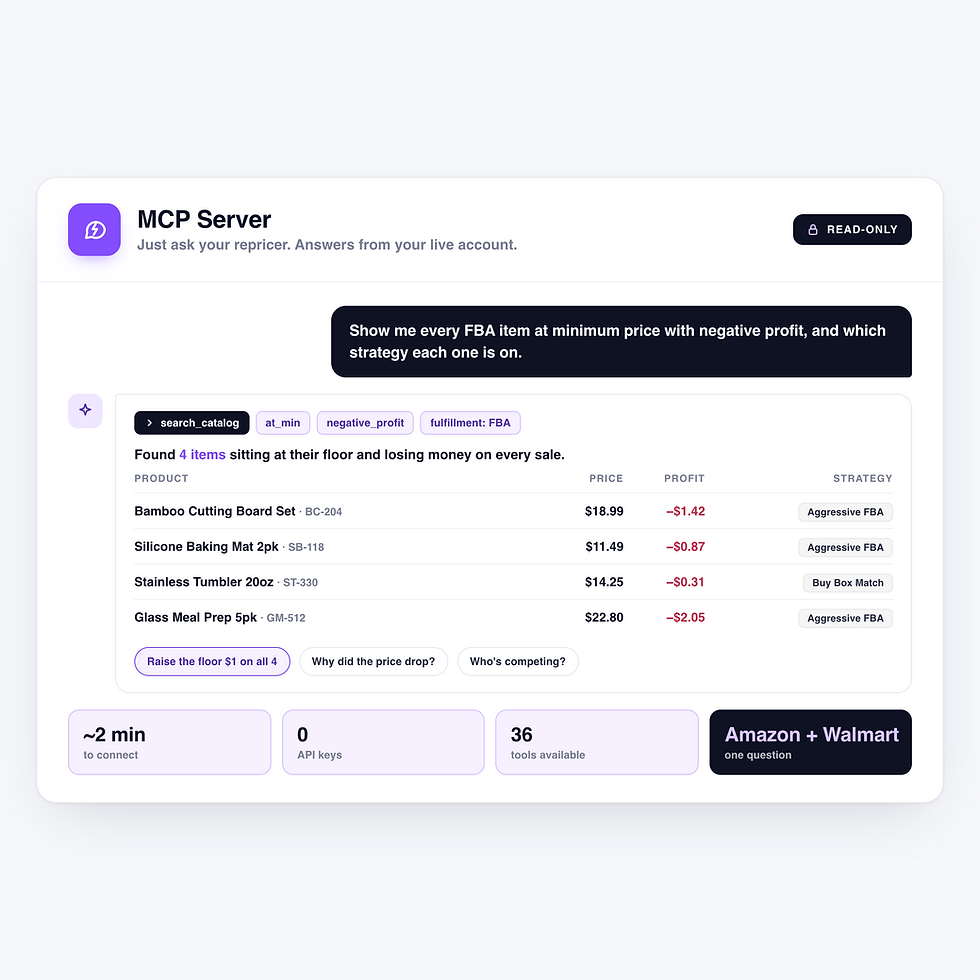
How it turns a chat window into a working view of your entire catalog
From connection to live answers in two minutes
Connect from inside Flashpricer
Pick your assistant to open the Flashpricer authorization screen, you sign in with your normal login, and you click Authorize. It runs on OAuth 2.0, so there's no API key to generate, nothing to install and nothing to paste into a config file. Your password is never shared with the assistant.
1
Decide what it can see and change
Permissions come in view and manage pairs across Products, Orders, Strategies, Channels and Reports. A new connection starts with view access to products and orders and nothing else. Anything that can change your data is labeled on the authorization screen and has to be approved on its own.
2
The MCP picks the right tools for the job
Ask "show my out-of-stock FBA items with no strategy" and the assistant maps it to a catalog search using any of more than 35 filters, from at_min and negative_profit to not_in_buybox and no_sales_last_90d. It chains steps on its own to work long-running jobs until they finish.
3
Preview your changes before making them
With write access, the MCP can push a price, enable repricing, assign strategies, build or adjust rules, make bulk updates and manage scheduled reports. The higher-risk actions show a before-and-after preview and wait for your approval. Every write is recorded in the item's history for review.
4
Why the answer to "is my repricing set up right?" usually goes unchecked
Because fine-tuning your strategies shouldn't take hours
Find margin leaks and patch them fast
A floor set a dollar too low, a strategy that's slightly wrong for the category, a competitor who showed up three weeks ago. Those don't go unfixed because sellers don't know how to fix them. They go unfixed because finding them means filters, tabs, and too much time. Not anymore.
Track listings that are under the radar
A listing you paused six months ago has been sitting at a stale price , and nothing in your normal workflow will remind you. "Which of my listings have repricing disabled?" surfaces them in a single chat. It's the kind of audit nobody schedules and everybody benefits from.
Understand every price change
Ask why the price moved over the last 30 days and who's competing right now, and you get the price changes, the orders around each one, and every competing offer sorted by total price, together. You spend your time deciding what to do about it instead of assembling the picture.
Run Amazon and Walmart side-by-side
Ask about your Walmart catalog the same way you ask about Amazon. If you sell on both, this is where you save the most time: "compare units sold and profit across my Amazon and Walmart channels last month" is one question, not two exports and an afternoon in a spreadsheet.


Your AI assistant questions, answered
What is MCP?
Model Context Protocol is an open standard that lets an AI assistant connect to an outside system and use it directly. In practice, it means your assistant queries your live Flashpricer account and answers from real data, instead of you exporting a CSV, pasting it into a chat window and hoping the model reads it correctly.
Which AI assistants work with it?
ChatGPT, Claude (desktop and web), Google Gemini, Grok, Microsoft Copilot and Cursor, plus CLI and editor tools like Claude Code, Gemini CLI and Codex. Flashpricer shows you the exact setup steps for each one when you connect.
Do I need a paid AI plan?
Usually, yes. Custom connectors typically require a paid ChatGPT, Claude or Grok plan. CLI and editor tools like Claude Code, Gemini CLI, Codex and Cursor work as well.
How long does setup take?
About two minutes. Go to Reports -> MCP Integration, click Connect an assistant, pick yours, and authorize with your normal Flashpricer login. There are no API keys and nothing to install.
What can I do with read-only access?
Most of it. Catalog searches, item lookups, repricing history, competition and Buy Box ownership, sales and profit reporting, strategy details, and finding and downloading exports all work with view permissions.
Can the assistant change my prices without asking me?
Not unless you give it permission to make changes, and even then the higher-risk actions wait for you. A new connection gets view access to products and orders only. If you grant manage access, override edits, manual price pushes, re-enabling repricing, bulk updates and scheduled report changes all preview first and wait for your confirmation. Assigning a strategy to an item and creating or editing a strategy apply directly, so ask to see the plan before you agree to it.
Does it work for Walmart?
Yes. The MCP server works across your Amazon and Walmart channels. You can search and report on your Walmart catalog, update Walmart referral fee percentages and shipping overrides in bulk, assign Walmart strategies, and compare performance across both marketplaces in a single question. The per-state Buy Box scan is the exception, since it covers Amazon US listings only.
Does it cost anything extra?
Connecting an assistant is included with your Flashpricer account. The one tool that costs anything is the Buy Box by State scan, which uses one credit per state and only charges for states that return a result. The assistant always shows you the estimated cost and your current balance before it runs one.
How do I see what the assistant changed?
Every write is recorded in the item's history and tagged to the assistant that made it. Every bulk update CSV is stored, and the assistant can pull the per-row error report for any bulk update to tell you exactly which rows applied and which didn't.
Is the data live?
Yes. The assistant queries your Flashpricer account at the moment you ask, so answers reflect your current prices, competition and orders.
How do I disconnect an assistant?
Go to Reports -> MCP Integration -> Active Connections and click the trash icon next to it. Access is cut off immediately. Connections also expire automatically, and you re-authorize when one lapses.
Do I need to know the tool names or filter codes?
No. Ask in your own words. The assistant maps your request to the right tool and filters, and it can chain steps together, like finding your negative-profit items and then pulling the recent price changes on the worst one.
I manage more than one Flashpricer account. Does that work?
Yes. If you belong to more than one organization, tell the assistant to switch to your other organization and it will move its context over.