
The data you need, delivered before you start your day
Flashpricer delivers the insights that matter straight to your inbox
→ Schedules daily, weekly, or monthly catalog reports
→ Offers dozens of preconfigured report templates
→ Builds custom reports using detailed rules and filters
→ Generates AI Performance Reports for each strategy
→ Automates delivery to multiple email recipients
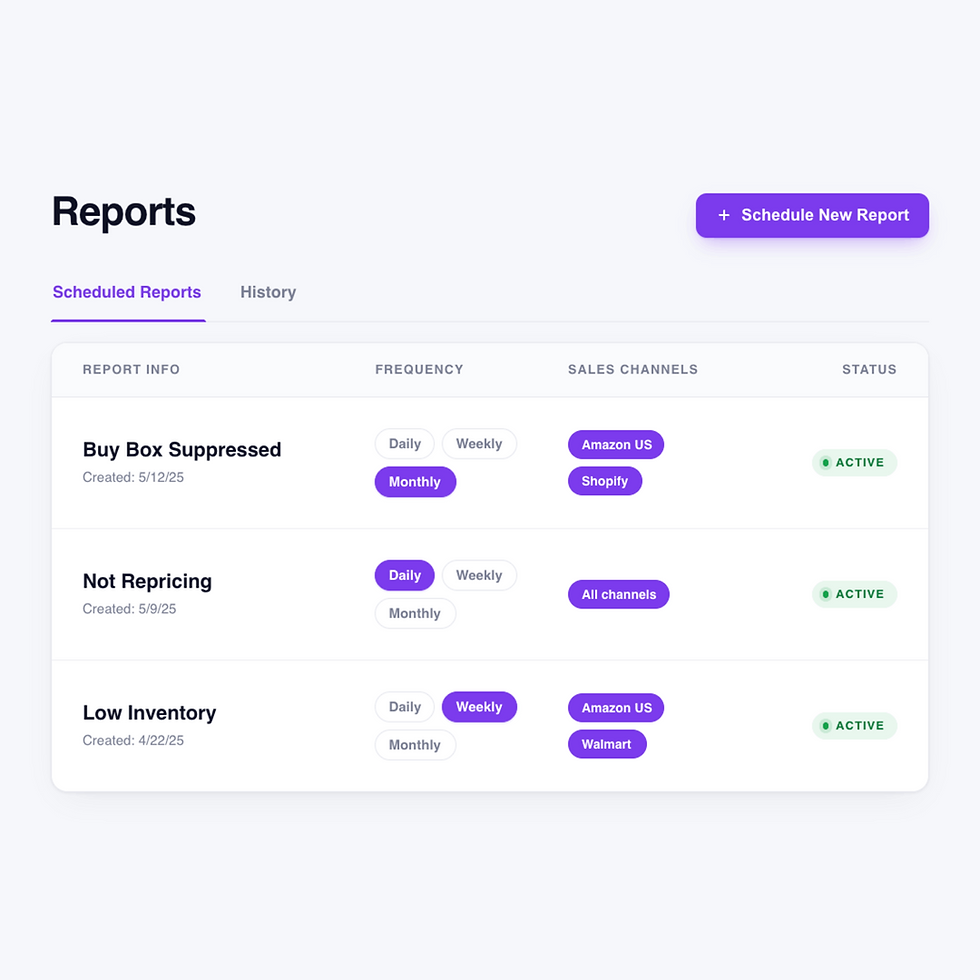
How a scheduled report gets built and delivered
Get inbox-ready insights in less than a minute
Pick a template or start from scratch
Preconfigured Reports are templates for high-value views like Generating Sales at Max, Generating Sales at Min Price, Not Repricing, Inaccurate P&L, Listings with No Sales, Suppressed Buy Box, or Errors on Channel. Custom Reports let you build from dozens of filters on the Products page, including At Max Price, Negative Profit, Missing Cost, Repricing Disabled, In Buy Box, Only Walmart, and With Sales.
1
Configure channels, strategies, and filters
Scope the report down to exactly the data you want. Select one or more sales channels — Amazon, Amazon Business, Walmart. Pick specific pricing strategies to focus the report on. Layer on any Products page filter or stack multiple filters to surface narrow segments like "FBA listings with negative profit on Amazon" or "Walmart listings at min price with sales in the last 30 days".
2
Set the cadence and email recipients
Choose how often Flashpricer sends the report. Add one or multiple email addresses as recipients so the right people on your team get the same snapshot at the same time. Give the report a descriptive name for organization. Click Schedule Report and the cadence begins; Flashpricer generates and emails each report automatically from that point on.
3
Manage everything with just two tabs
The Scheduled Reports tab shows every active report with its name, creation date, frequency, recipients, filters applied, and status. You can easily pause, resume, or delete any report with one click. The History tab logs every report that's been generated with its date, status, filters used, row count, and a download link, so you can pull any past report at any time.
4
Why scheduled insights beat on-demand checking
Surface the critical issues before they cost you money
Find upside you didn't know you had
The "Generating Sales at Max" report finds products where the market is telling you your max is probably too low. Sellers who read this report weekly routinely discover SKUs that would benefit from a higher max and a closer look.
Catch listings that aren't doing their job
We have report templates for spotting broken strategy assignments, items without costs assigned, API issues, or listings stuck in the wrong state. Scheduled weekly delivery catches them while the fix is still trivial.
Align your team on the same numbers
Every scheduled report can send to multiple recipients, so your VA, your analyst, and your partner all receive a single source of truth on Monday morning. The History tab keeps a clean archive of every snapshot for maximum transparency.
Let AI tell you which strategies work
AI Reports generate a written summary of how each strategy has affected revenue, units, profit, COGS, and fee changes. Download it, share it with your team, and decide what to keep, kill, or rebuild with data instead of gut.


Frequently asked reporting questions
What's an AI Performance Report?
AI Performance Reports are a separate, on-demand feature powered by Flashpricer CH.AI. From the Strategies page, select any strategy and choose Compare Performance. Flashpricer automatically sets the prior equivalent window as the comparison period and generates a breakdown of revenue change %, units sold change %, profit change %, COGS and fee shifts, plus an AI-written summary of the trend. Each AI report uses 1 credit from your account balance, and you can download the completed analysis to share with your team.
Can I pause a report without deleting it?
Yes. From the Scheduled Reports tab, any report can be paused, resumed, or deleted. Filters and recipients are preserved on paused reports so you can pick back up where you left off.
Can I send reports to more than one person?
Yes. Each scheduled report accepts one or multiple email recipients, so your whole team can open the same file at the same time.
How often can I schedule reports? Can I download old ones?
Daily, Weekly, or Monthly. You can also schedule a one-time report if you just want to test a filter setup before committing to a recurring delivery. The History tab on the Reports page logs every report Flashpricer has generated for you, with the generation date, status, filters used, number of rows, and a download URL for each one.
What preconfigured report templates are available?
Default View (full data export, no filters), Not Repricing (Needs Attention), Generating Sales at Max, Inaccurate P&L (Last 30 Days), Listings with No Sales (Needs Attention), Generating Sales at Min Price, Suppressed Buy Box, and Errors on Channel. Each one answers a specific question a seller would otherwise have to build manually.
What's the difference between Custom Reports and Preconfigured Reports?
Custom Reports are built from scratch using any filter available on the Products page — you pick your filters, channels, strategies, and frequency. Preconfigured Reports are expert templates for high-value views: Generating Sales at Max, Generating Sales at Min Price, Not Repricing (Needs Attention), Inaccurate P&L (Last 30 Days), Listings with No Sales, Suppressed Buy Box, Errors on Channel, and Default View. You pick a template, choose the channels and cadence, and you're done.
What filters can I use in a Custom Report?
Any filter available on the Products page. That includes At Min Price, At Max Price, In Buy Box, Buy Box Suppressed, Negative Profit, Missing Cost, Repricing Disabled, Repricing Error, FBA/WFS Listings, FBM Listings, Only Amazon, Only Walmart, No Strategy Assigned, With Sales, and 20+ more. You can also layer on Sales Channel and Strategy filters for tighter scoping.